Square-drive recess
Measure the actual socket drive opening and corner relief rather than treating the nominal 1/2-inch family as the finished printed post size.
 EazyMake 3DUseful parts. Made easy.
Editable socket organiser template
This compact starter lays out 10, 12, 13, 14, 17 and 19 mm labels on one 1/2-inch-drive strip. Adjust the order, tile width, depth, square-post fit, magnet pockets and drop-on dovetails, then calibrate the interface that matters before printing the organiser.
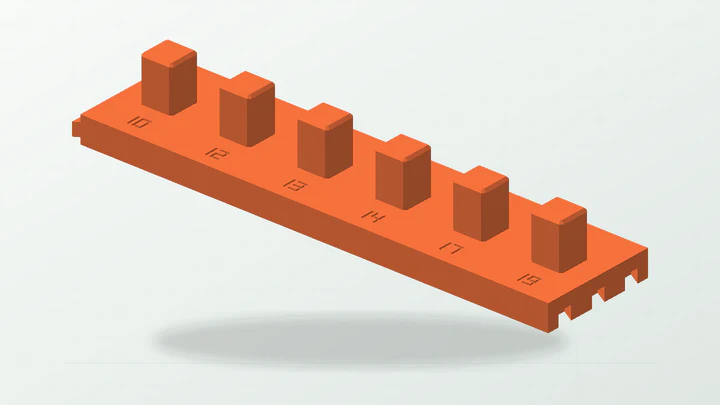
A tidy, editable starting row for measured sockets—not a promise of universal post fit, magnetic holding force or compatibility with every socket profile.
The starter dimensions are there to make the controls understandable. Replace them with evidence from the real part, space and print setup.
Measure the actual socket drive opening and corner relief rather than treating the nominal 1/2-inch family as the finished printed post size.
Check the largest outside diameter or profile in each position so neighbouring sockets can be removed without collision.
Allow for a nominal 180 × 45 mm strip, the sockets themselves and finger access around the row.
Measure diameter and thickness for any magnets and decide on polarity, installation method and safe retention separately.
These values produce the preview shown above. They remain editable after the template opens in the EazyMake studio.
The generator keeps the important decisions visible and carries one parameter set through geometry, inspection, calibration and export.
Enter only the sizes you actually use, in the order that makes sense at the bench or in the drawer.
Check the real drive recesses and outside socket envelopes, then choose fitted, uniform or explicit widths with enough removal space.
Use one strip or separate tiles, then choose the supported drop-on or sliding dovetail engagement and relevant edges.
Print the square-post trials for socket fit and the dovetail trials for tile joining; one passing experiment does not prove the other.
Inspect labels, posts, roofed slots and magnet-pocket bridges in the slicer, then install any magnets after the parts have cooled.
Answers specific to this starter and the measurements it exposes.
Six uniform 30 mm cells produce a nominal 180 mm strip, 45 mm deep. The sockets can extend beyond that base envelope, so measure the complete set and available space.
Yes. The labels are entered as a space-separated list and remain in that order. Decimal metric sizes and fractional imperial labels are supported by the organiser workflow.
Choose the interface that affects your immediate build. Post coupons test socket engagement; dovetail coupons test how tiles join. Run both when both fits matter.
No. Pocket geometry does not establish magnetic pull, polarity, adhesive suitability or safe retention. Measure and test the exact magnets and installation.
Use the guide when you need the reasoning, or open another template to see the same measurement-first workflow in a different part family.
Open the real generator, replace the example dimensions and keep the calibration result tied to your printer and material.