Workpiece datum edges
Choose two straight, repeatable reference edges and confirm how the printed template will be aligned to each one.
 EazyMake 3DUseful parts. Made easy.
Editable drill-template starter
This 120 × 36 mm starter places four 4.8 mm finished guides from a left end and near long-edge datum. It keeps the first offset, 30 mm centre spacing, row position, countersunk entries and recessed label visible, with diameter trials before the full template.
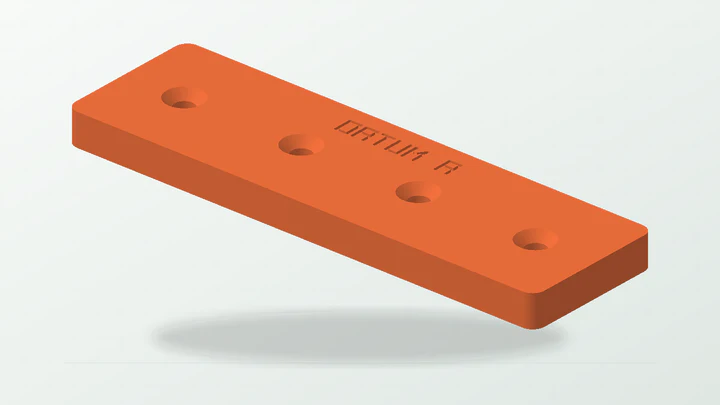
A transparent way to transfer one measured row—not a hardened drill bushing, automatic locating fence, clamp or guarantee of positional accuracy.
The starter dimensions are there to make the controls understandable. Replace them with evidence from the real part, space and print setup.
Choose two straight, repeatable reference edges and confirm how the printed template will be aligned to each one.
Measure each centre from the nominated datums: 15 mm from the left end and 18 mm from the near edge in this starter.
Confirm four centres at 30 mm spacing fit the real workpiece and leave enough edge and web material in the template.
Measure the actual cylindrical surface that enters the printed guide and decide the required movement or location behaviour.
Plan how both template and workpiece will be restrained without relying on the printed guide to contain a rotating tool.
These values produce the preview shown above. They remain editable after the template opens in the EazyMake studio.
The generator keeps the important decisions visible and carries one parameter set through geometry, inspection, calibration and export.
Name the left end and near long edge on both the drawing and real workpiece so the row cannot be mirrored or referenced inconsistently.
Set guide count, first-centre offset, centre spacing and row offset, then review the numbered placement diagram.
Choose a plain or countersunk entry while preserving the minimum straight guide land, edge distance, web and backing.
Compare three size-coded samples using the actual tool or guide bushing on the intended printer setup.
Print the template flat, align and clamp it independently, then prove the transferred centres on scrap before using a final workpiece.
Answers specific to this starter and the measurements it exposes.
They are 15, 45, 75 and 105 mm from the left datum, with every centre 18 mm from the near long edge.
It is a finished starting diameter, not a nominal tool specification. Measure the actual drill shank or guide bushing, choose the required behaviour and print the diameter trials.
No. It provides a shaped entry while the remaining straight guide land carries the printed bore. Perpendicularity, wear and safe control still require physical verification and suitable technique.
Check the printed guide diameter, align both named datums, clamp independently and transfer the row onto scrap. Measure the resulting centres and repeatability before using a final workpiece.
Use the guide when you need the reasoning, or open another template to see the same measurement-first workflow in a different part family.
Open the real generator, replace the example dimensions and keep the calibration result tied to your printer and material.